53 controls · read-only by default · priced in pounds
Prove the value of every Microsoft 365 tenant you manage.
SurePosture assesses your clients' tenants with read-only consent, writes the report you would have spent two days on, and shows, assessment after assessment, exactly what you improved.
- Read-only Microsoft Graph consent
- No mail, file or chat content read
- No card needed for the trial
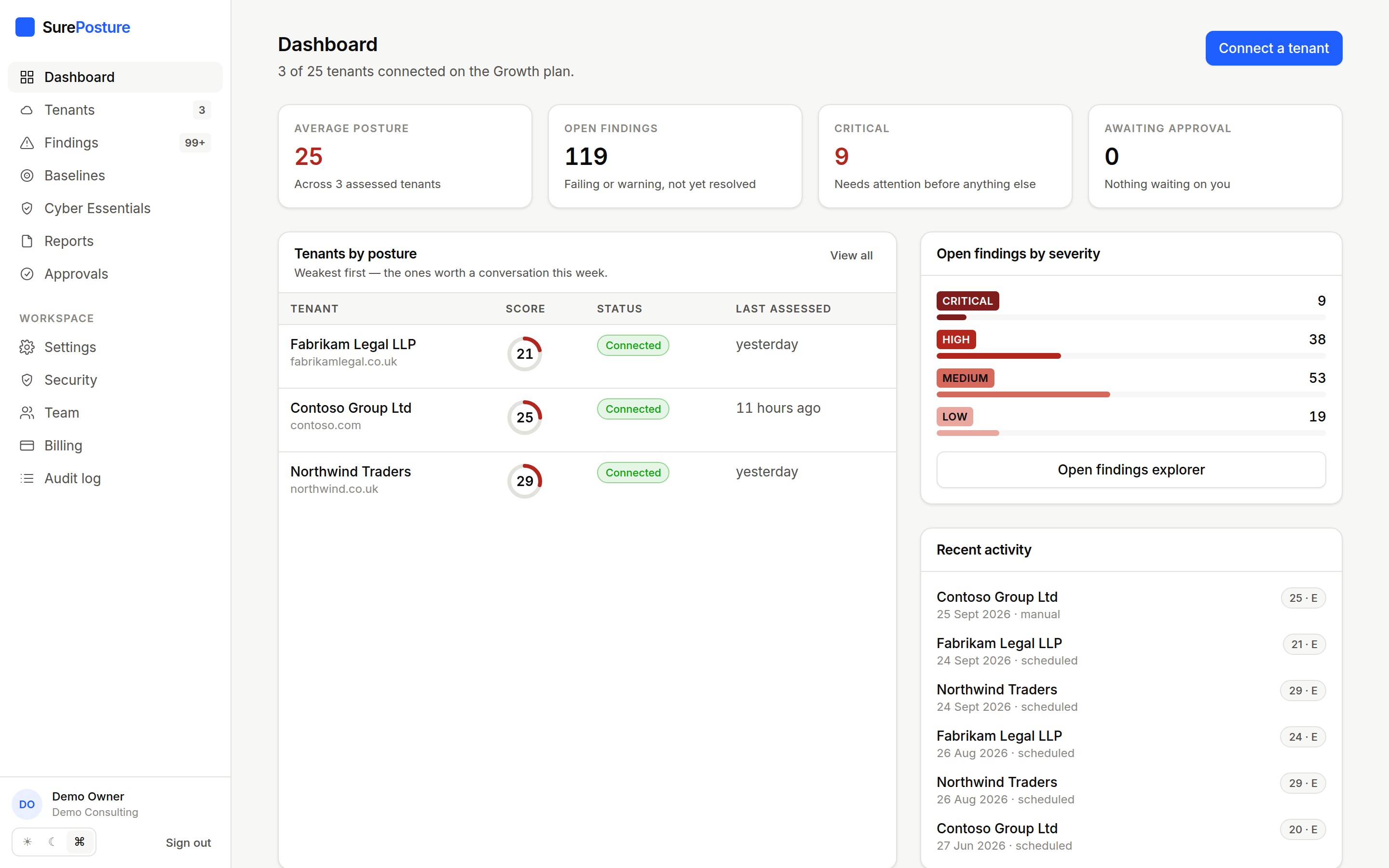
Every finding is mapped to the frameworks your clients are audited against.
- CIS Microsoft 365
- NIST CSF
- ISO/IEC 27001
- Essential Eight
- Microsoft Secure Score
- 53
- controls across 8 areas, each with evidence and fix steps
- Read-only
- consent; write access is separate, optional and approval-gated
- Minutes
- from consent to a branded, client-ready report
- Per tenant
- pricing in GBP, with the whole team included
How it works
From consent link to client report in one sitting.
- 1
Connect
Send your client’s Global Administrator a consent link. They see exactly which read-only permissions are requested, and can revoke them at any time.
- 2
Assess
SurePosture reads identity, access, devices, email, collaboration, threat protection and licensing through Microsoft Graph and public DNS, then evaluates 53 controls.
- 3
Report and improve
Generate a branded report, work through the prioritised roadmap, and re-assess on a schedule to prove what changed.
Verified progress
Show clients what you fixed, and prove it.
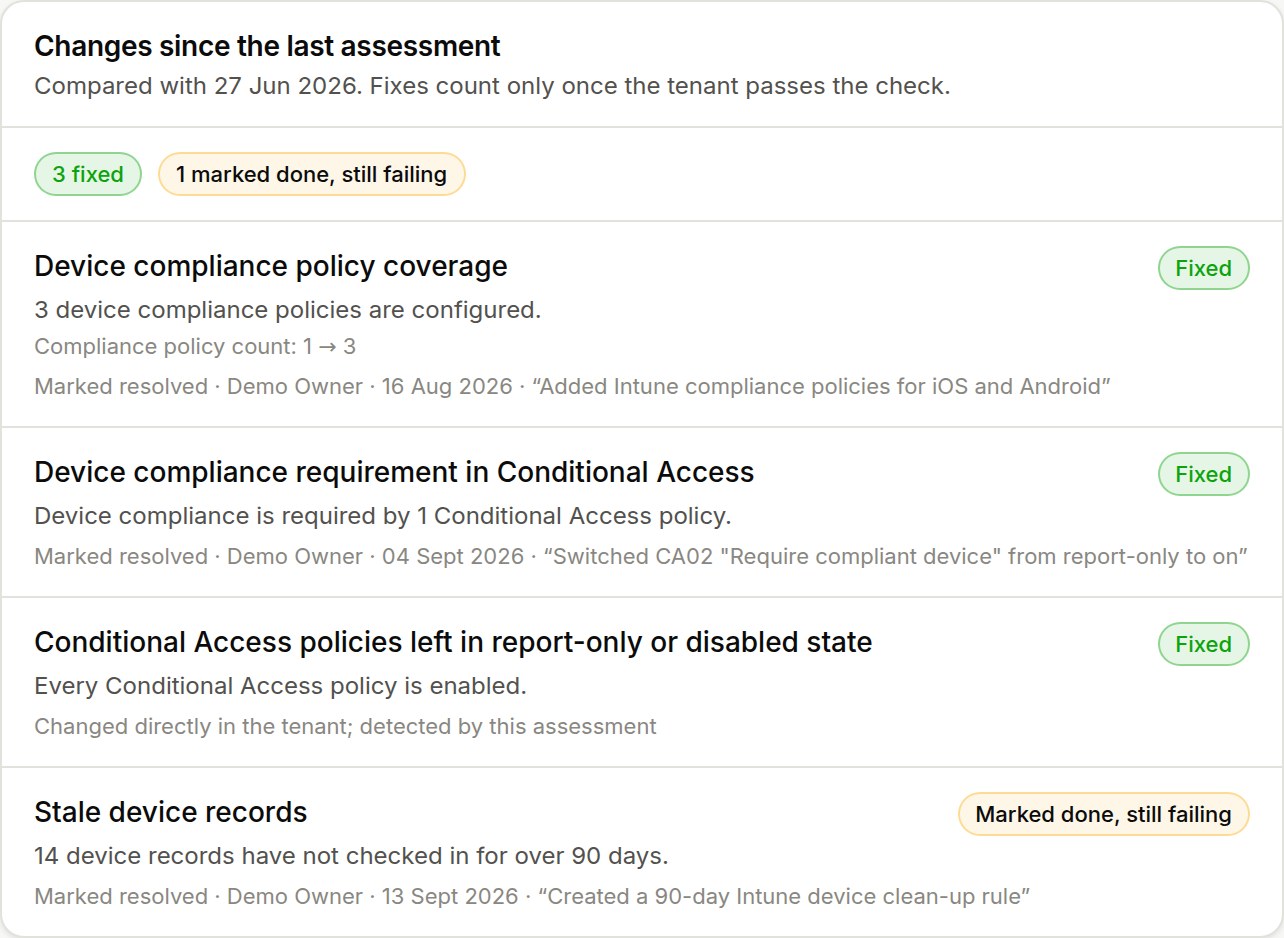
Every assessment is compared with the last. A fix only counts once the live tenant passes the check, and each one is credited to whoever did it: an approved automated change, or a consultant’s own note.
- Fixed, improved, regressed and new, per control
- “Marked done, still failing” so nothing slips through
- The setting that changed, e.g. compliance policies 1 → 3
Client review pack
The quarterly review, written for you.
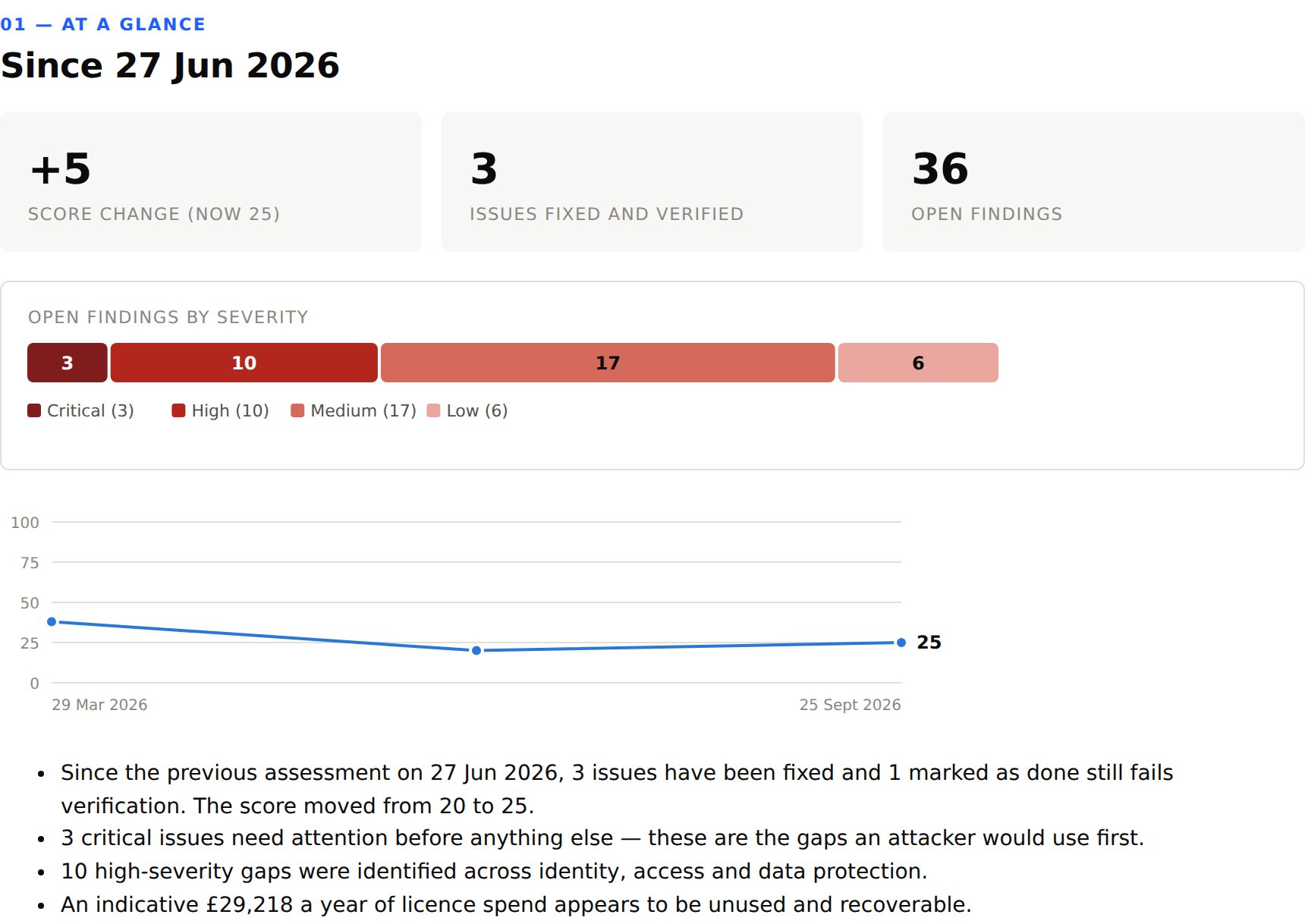
A short, branded PDF for the client meeting: score movement, what was delivered and by whom, what needs attention, the hardware budget and the next steps.
- Your logo and colours on the cover
- Trend chart across every assessment
- Recoverable licence spend in pounds
Device lifecycle
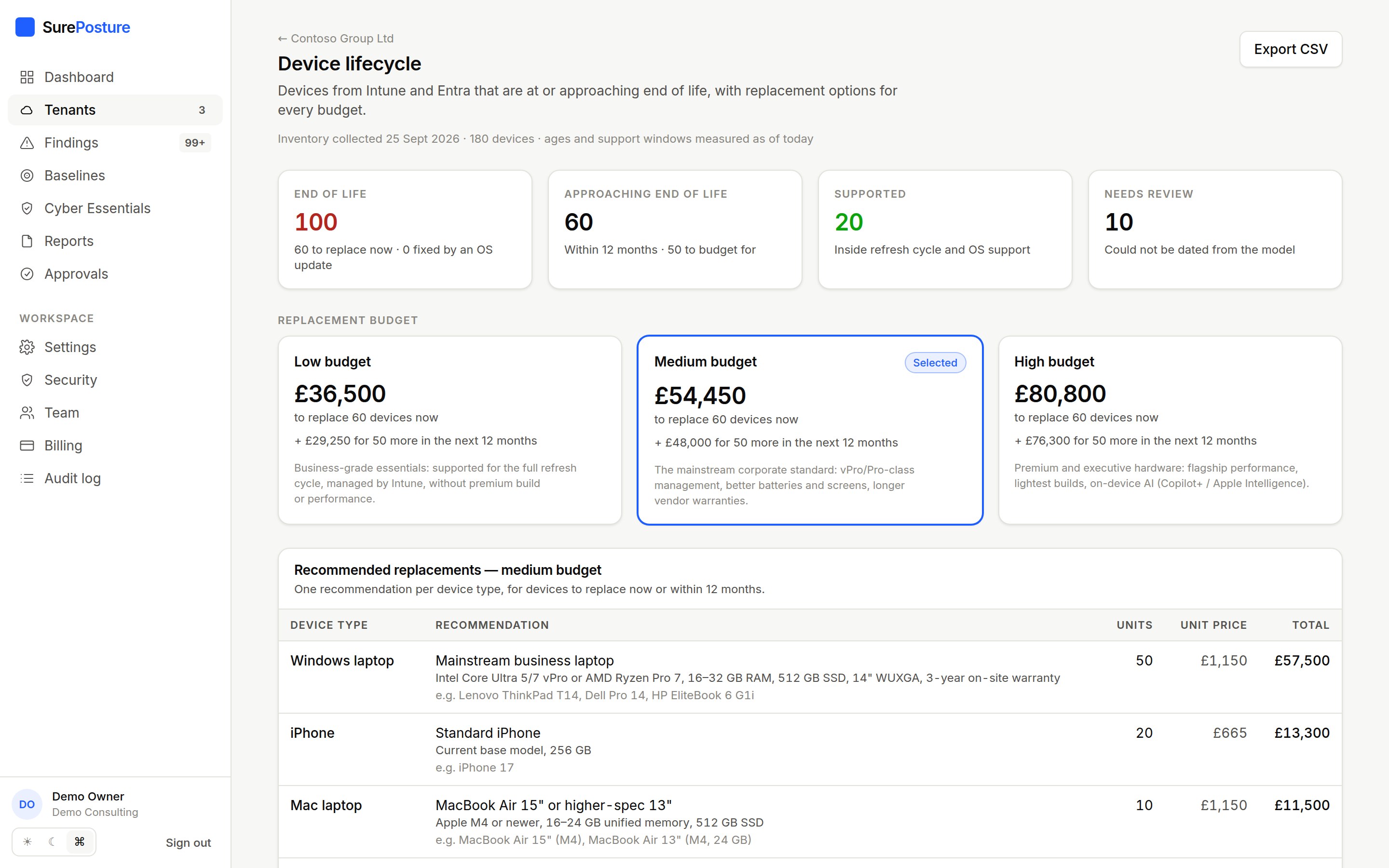
Turn the Intune inventory into a refresh budget.
Every device is dated from its model and checked against its operating system’s support window. Devices at or near end of life get replacement options at three budgets, with a four-year forecast.
- Separates “replace” from “just needs an OS update”
- Windows 11 eligibility, Intel Macs, unsupported iPhones
- Low, medium and high tiers in GBP, exportable to CSV
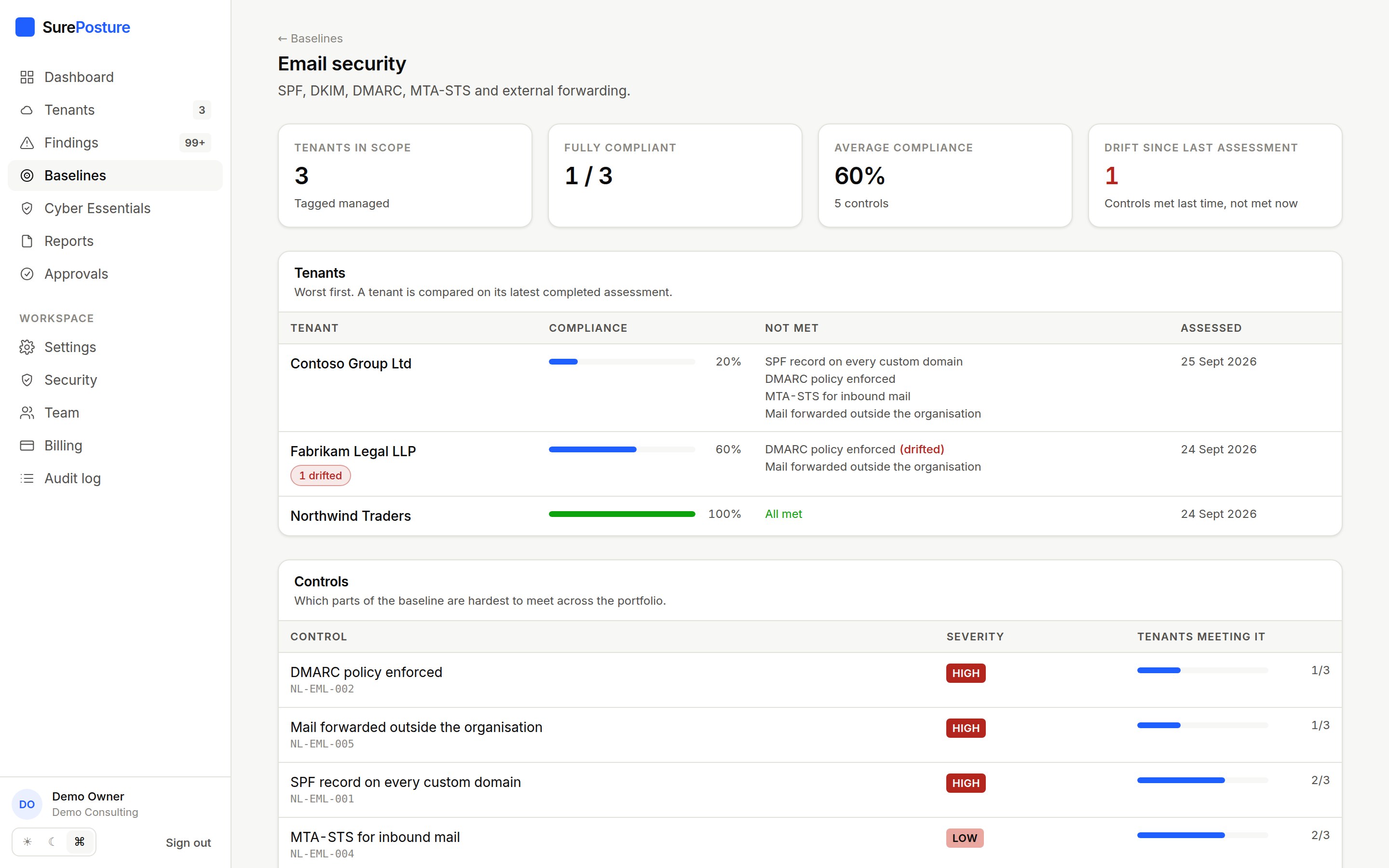
Baselines
One standard, every tenant, drift at a glance.
Define what your managed service promises once and hold every tenant to it. The weakest tenants and hardest controls come first, and anything that slipped since last time is flagged.
- Scope by tenant tag, e.g. “managed” or “premium”
- Templates for essentials, CIS and email security
- Drift included in the assessment email
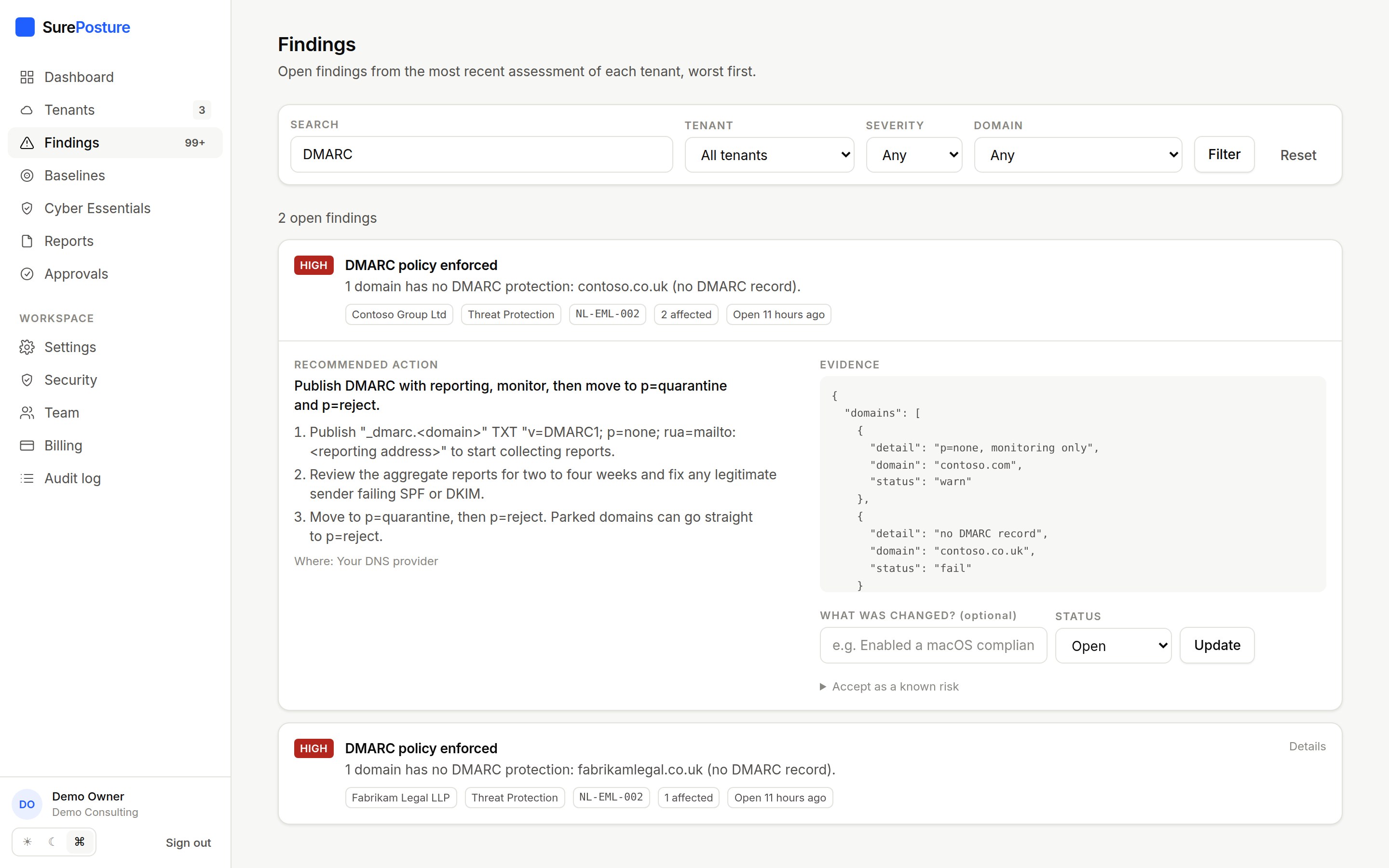
Email security
Spoofing and forwarding, checked on every domain.
SPF, DKIM, DMARC and MTA-STS are read from public DNS for every custom domain, including the parked ones attackers prefer. Inbox rules forwarding mail outside the organisation are found through Microsoft Graph.
- Evidence and step-by-step fixes per domain
- No extra permission for the DNS checks
- Rule definitions only; mail content is never read
Also included
Everything a managed service needs around the assessment.
Findings explorer
Every open issue across every tenant, worst first, with evidence and remediation steps.
Approvals and rollback
Fixes are dry-run, approved by a second person, executed with a rollback plan and audited.
Scheduled assessments
Re-assess weekly or monthly, with a report produced automatically.
Email notifications
Finished assessments, anything that got worse, reports ready and approvals waiting.
White-label reports
Executive, technical and board reports as PDF or HTML, with your brand on them.
Audit trail
Consents, assessments, downloads, changes and approvals, recorded with who and when.
Free tool
How easy is your domain to spoof?
Check SPF, DMARC, DKIM and MTA-STS for any domain in seconds, with the exact fix for anything missing. No sign-up.
Pricing
Priced by the tenants you manage.
Seats are included, so the whole delivery team can use it. One recovered licence per tenant usually pays for the subscription.
Starter
For independent consultants and small IT teams. Up to 5 tenants.
£99/month
Billed monthly, excluding VAT
Start free trial- Up to 5 tenants
- 5 user seats
- All 53 controls and branded reports
- Change tracking, baselines and device lifecycle
- Scheduled assessments
- 12 months of history
Growth
For managed service providers. 25 tenants, scheduled assessments and approved automation.
£299/month
Billed monthly, excluding VAT
Start free trial- Up to 25 tenants
- 15 user seats
- All 53 controls and branded reports
- Change tracking, baselines and device lifecycle
- Scheduled assessments
- Approved automation with rollback
- API access (coming soon)
- 24 months of history
Scale
For established MSPs. 100 tenants, SSO and full API access.
£799/month
Billed monthly, excluding VAT
Start free trial- Up to 100 tenants
- 50 user seats
- All 53 controls and branded reports
- Change tracking, baselines and device lifecycle
- Scheduled assessments
- Approved automation with rollback
- API access (coming soon)
- Single sign-on (coming soon)
- 36 months of history
Enterprise, self-hosted and per-engagement pricing on request.
Data protection
Your clients' data, handled like it matters.
SurePosture holds privileged read access to the tenants you manage, so every design decision starts there.
Read-only by default
Write access is a separate consent, off per tenant until an administrator enables it.
Configuration, not content
Mail, files, chats and calendars are never requested or read.
No credentials held
SurePosture signs in as its own app; your administrator can revoke it in one click.
Every action audited
Consents, assessments, downloads and changes are recorded with who and when.
How do I connect a client’s tenant?
Add the tenant in SurePosture and send the generated consent link to a Global Administrator (or Privileged Role Administrator) in that tenant. Microsoft shows them exactly which read-only permissions are requested. Once they approve, the first assessment starts automatically.
What permissions does SurePosture need?
Read-only Microsoft Graph application permissions: organisation, users, groups, policies, directory roles, applications, audit logs, reports and security events. Optional read permissions (Intune, Identity Protection, SharePoint settings, mailbox rules) widen coverage; without them the related controls are reported as not assessed, never as passed. The full list is on the data protection page.
Can SurePosture change anything in a tenant?
Not unless you set it up to. Assessment is read-only. Automated fixes need a separate consent for write permissions, automation switched on for that specific tenant, a successful dry run, and approval from someone other than the person who proposed the change. Every change records a rollback plan and is audited.
Does SurePosture read emails, files or Teams chats?
No. It reads configuration and directory information: accounts, groups, policies, devices and subscriptions. It does not request the permissions that would allow it to read message bodies, file contents, chats or calendars. The forwarding check reads inbox rule definitions only.
Does SurePosture help with Cyber Essentials?
Yes, as a readiness check. Each tenant has a Cyber Essentials view that maps the scheme’s five controls to the checks SurePosture runs: MFA, admin rights, leavers, device configuration and unsupported operating systems are evidenced straight from the tenant. Firewalls, anti-malware and patching timelines cannot be seen from Microsoft 365, so your consultants record those with a note, and the technical report includes the result. It prepares a client for assessment; certification itself is awarded by an IASME certification body.
Assess your first tenant today.
Fourteen days, one tenant, everything included. A branded report in front of you in minutes.